Fixing Missing Glue Records in DNS Delegation
Published:
30 Sep, 2026
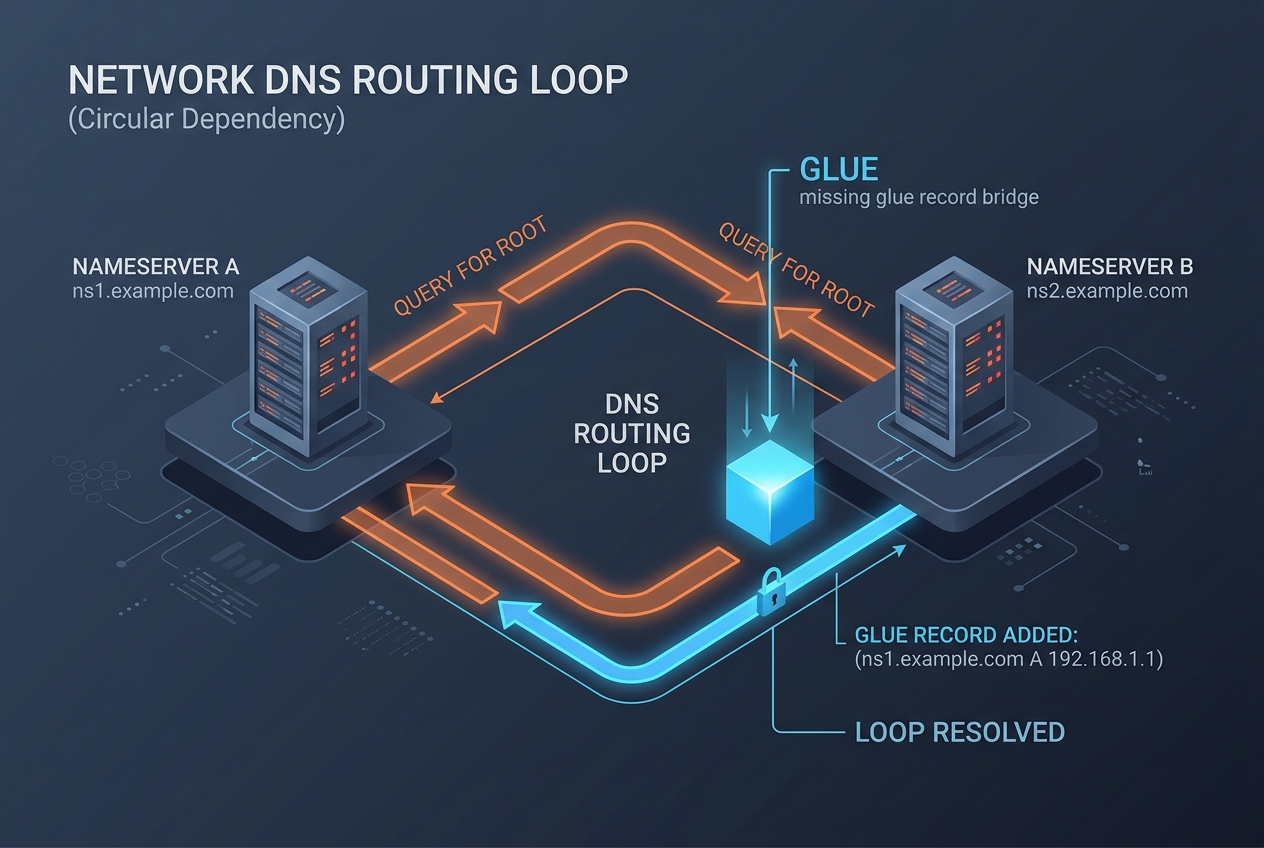
The Problem of Circular DNS Dependencies
When you delegate a DNS zone to nameservers that reside within that same zone (for example, assigning ns1.example.com and ns2.example.com as the authoritative servers for example.com), you introduce a circular resolution dependency. A recursive resolver trying to find the IP address of example.com queries the .com top-level domain (TLD) servers. The TLD servers reply with a referral containing NS records that point to ns1.example.com. However, to resolve ns1.example.com, the resolver must query the authoritative servers for example.com—which it cannot locate without the IP address of ns1.example.com.
To break this infinite loop, the parent zone (in this case, the .com registry) must provide glue records: auxiliary A and AAAA records in the ADDITIONAL SECTION of the referral response that directly map the nameserver hostname to its IP address. When glue records are missing, misconfigured, or deleted, recursive resolvers fail to traverse the delegation, returning SERVFAIL or timing out entirely.
In-Bailiwick vs. Out-of-Bailiwick Delegations
Understanding whether a delegation requires glue records depends on the relationship between the nameserver name and the zone domain (the zone bailiwick):
| Zone Domain | Nameserver FQDN | Type | Glue Record Required? |
|---|---|---|---|
| example.com | ns1.example.com | In-Bailiwick | Yes (Parent must supply IP) |
| sub.example.com | ns1.sub.example.com | In-Bailiwick | Yes (example.com must supply IP) |
| example.com | ns1.cloudflare.com | Out-of-Bailiwick | No (Resolved independently via .com) |
| sub.example.com | ns1.example.com | Out-of-Bailiwick | No (Resolved from example.com zone) |
Diagnosing Missing Glue Records with dig
A standard recursive query often obscures delegation failures because the resolver returns a generic SERVFAIL code or serves cached data. To diagnose missing glue records accurately, query the parent nameservers directly using non-recursive lookups (+norecurse) or inspect delegation paths with dig +trace.
Step 1: Inspect the Parent Referral Response
Query the parent authoritative servers directly for your child domain. For example, to check the delegation of a child zone on the root or TLD server:
dig @a.gtld-servers.net example.com NS +norecurseExamine the output. A healthy in-bailiwick delegation returns the NS records in the AUTHORITY SECTION and the corresponding IP addresses in the ADDITIONAL SECTION:
;; QUESTION SECTION:
;example.com.                   IN      NS

;; AUTHORITY SECTION:
example.com.            172800  IN      NS      ns1.example.com.
example.com.            172800  IN      NS      ns2.example.com.

;; ADDITIONAL SECTION:
ns1.example.com.        172800  IN      A       198.51.100.10
ns2.example.com.        172800  IN      A       198.51.100.20
If the ADDITIONAL SECTION is completely empty or missing IPv4/IPv6 records for those specific nameservers, the delegation has missing glue.
Step 2: Trace Delegation for Subdomains
If the missing glue occurs between an apex domain and a delegated child subdomain (such as internal.example.com delegated to ns1.internal.example.com on your own BIND or PowerDNS servers), check the parent zone response:
dig @ns1.example.com internal.example.com NS +norecurseIf your zone file contains the NS delegation record but lacks the corresponding A or AAAA record for ns1.internal.example.com inside the example.com zone file, the nameserver will reply with an AUTHORITY SECTION without any glue in the ADDITIONAL SECTION.
Correcting Missing Glue at the Registry and Registrar Level
When the parent zone is a TLD (like .com, .net, or .org), glue records cannot be created inside your standard DNS hosting control panel. They must be registered as Child Nameservers or Host Records with your domain registrar, which pushes the IP mappings to the registry via the Extensible Provisioning Protocol (EPP).
- Log in to the domain registrar managing the apex domain.
- Navigate to Custom Host Records, Nameserver Registration, or Child Nameservers (terminology varies by registrar).
- Create explicit host entries for ns1.example.com and ns2.example.com mapped to their public IPv4 (and IPv6) addresses.
- Update the domain delegation to point to the newly registered hostnames.
Correcting Missing Glue in Self-Hosted DNS (BIND9 & PowerDNS)
When delegating a child zone to child-hosted nameservers within your own authoritative nameservers, you must include in-bailiwick address records in the parent zone configuration.
BIND9 Configuration Example
In the parent zone file (/etc/bind/zones/db.example.com), include both the NS delegation and the glue A/AAAA records:
; Subdomain Delegation
internal.example.com.      IN  NS  ns1.internal.example.com.
internal.example.com.      IN  NS  ns2.internal.example.com.

; Required In-Bailiwick Glue Records
ns1.internal.example.com.  IN  A     203.0.113.53
ns1.internal.example.com.  IN  AAAA  2001:db8::53
ns2.internal.example.com.  IN  A     203.0.113.54
ns2.internal.example.com.  IN  AAAA  2001:db8::54
Validate the syntax and reload BIND:
named-checkzone example.com /etc/bind/zones/db.example.com
rndc reload example.com
Verifying Propagation and Integrity
After registering glue at your registrar or updating zone files, clear local resolver caches and verify that upstream resolvers receive the proper referral structures. You can perform an external diagnostic check using the InfoWebStats DNS Lookup tool to inspect raw authority answers, record types, and response flags across independent network vantage points.
Finally, run a full traversal test from the root down to the leaf authoritative nameserver:
dig +trace +additional example.com AVerify that each transition between zones contains populated IP records for in-bailiwick hostnames without fallback to secondary resolution loops.