Why CNAME at the Apex Fails and How Flattening Works
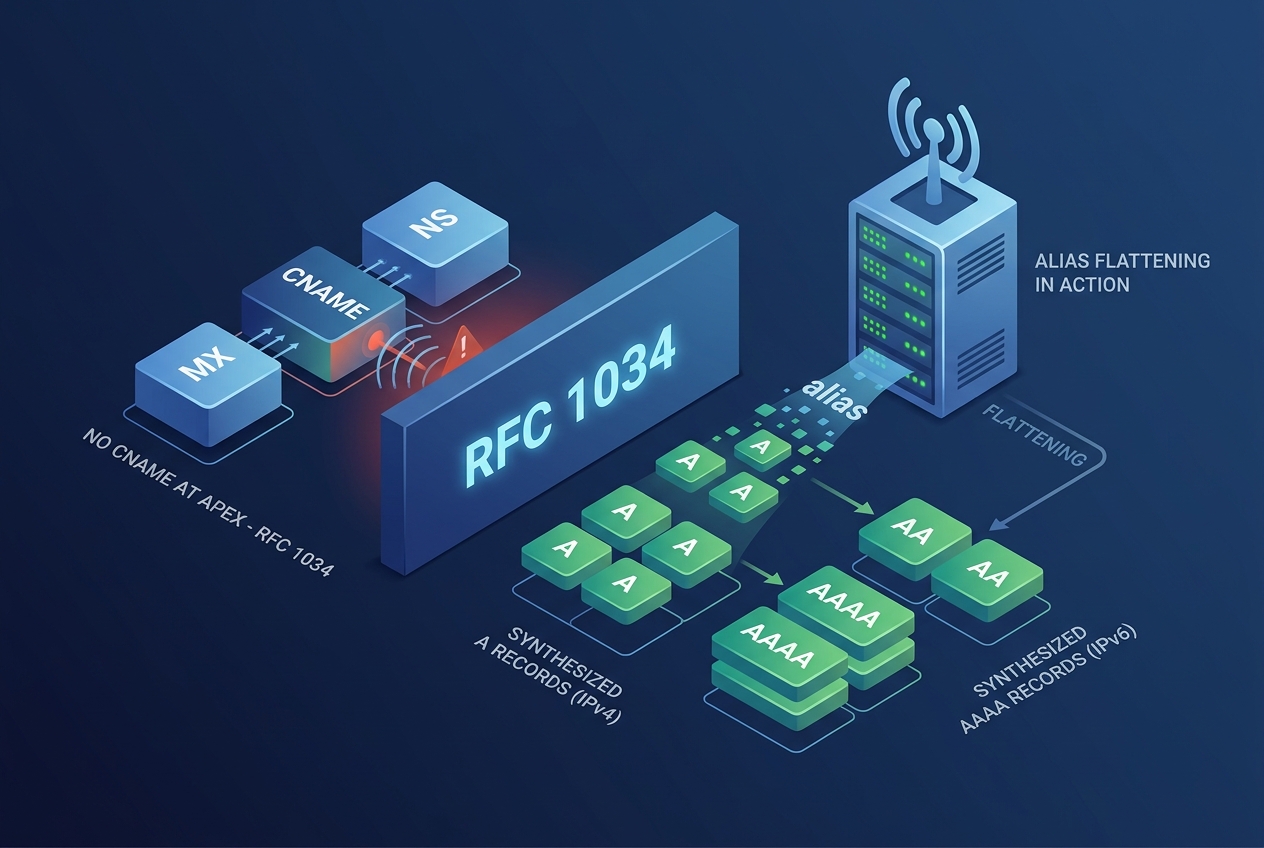
Attempting to map a zone apex (such as example.com) directly to an external hostname (like a CDN endpoint, object storage bucket, or cloud load balancer) using a standard CNAME record triggers protocol-level failures. Standard DNS protocol rules explicitly forbid this configuration, leading to lost email delivery, broken zone delegations, or zone parsing rejections by authoritative servers.
The Protocol Restriction: RFC 1034 Section 3.6.2
The restriction originates in RFC 1034, Section 3.6.2:
If a CNAME RR is present at a node, no other data should be present; this ensures that the data for a canonical name and its aliases cannot be different.
The root of every DNS zone requires critical records to function properly:
- SOA (Start of Authority): Defines zone serial, refresh intervals, retry timers, and negative caching TTL.
- NS (Name Server): Defines the authoritative nameservers responsible for the zone delegation.
- MX (Mail Exchange): Frequently placed at the apex to handle domain-level email routing.
- TXT: Commonly deployed at the apex for SPF (v=spf1), domain verification, and DMARC policies.
Because the zone apex must contain at least an SOA record and one or more NS records, placing a CNAME at the apex violates the rule that no other record type can coexist alongside an alias.
What Happens When Apex CNAME Is Injected
If an authoritative server accepts an apex CNAME without protective mechanisms, several structural DNS failures occur:
| Component | Direct Failure Mechanism |
|---|---|
| Authoritative Zone Load | BIND (named-checkzone) and NSD will reject the zone file completely with errors like CNAME and other data. |
| Email (SMTP) | MTAs querying MX for [email protected] follow the CNAME instead. If the canonical target lacks MX records, mail delivery fails. |
| DNSSEC Validation | The zone apex contains DNSKEY and NSEC/NSEC3 records. Injecting a CNAME alongside them invalidates the chain of trust, causing validating recursive resolvers to return SERVFAIL. |
How CNAME Flattening and ALIAS Records Resolve the Issue
Because modern infrastructure often relies on dynamic hostnames (such as lb-123.us-east-1.elb.amazonaws.com or custom.cdn.net), DNS providers created server-side workarounds commonly known as CNAME Flattening, ALIAS, or ANAME records.
These pseudo-records do not exist as distinct resource record types within standard RFC specifications. Instead, they represent an authoritative nameserver function:
- You configure an ALIAS or flattened entry pointing to a target hostname at the apex.
- The authoritative nameserver detects queries for A or AAAA records at the apex.
- The authoritative server acts as an internal recursive client, queries the target hostname, retrieves its current IP addresses, and synthesizes standard A and AAAA responses directly to the querying client.
- Because the external client receives standard address records, the apex continues serving its native SOA, NS, and MX records without violating RFC 1034.
Diagnosing Apex Configurations with dig
To inspect how a zone apex behaves, use dig against your authoritative nameservers. First, query the apex for address records:
dig @ns1.yournameserver.com example.com A +noall +answerA properly flattened setup returns concrete IP addresses:
example.com.    60    IN    A    192.0.2.1
example.com.    60    IN    A    192.0.2.2
Now query for the SOA record at the apex:
dig @ns1.yournameserver.com example.com SOA +noall +answerIf a broken implementation served a raw CNAME, the SOA query would often return the CNAME answer instead of the expected authority record:
;; BROKEN BEHAVIOR:
example.com.    300   IN    CNAME   target.example-cdn.com.
Additionally, check the TTL values returned on flattened address records. Authoritative servers generally inherit the TTL of the canonical target. If the target has an aggressive 60-second TTL, recursive resolvers will re-query frequently, exposing your domain to latency overhead or upstream resolver throttling if the provider internal recursive cache expires.
Verifying Consistency with InfoWebStats
Local tests with dig only confirm how a single resolver or authoritative node behaves. To ensure the apex resolves cleanly across geographic regions without leaking CNAME records or dropping MX lookups, run a full verification with the InfoWebStats DNS Lookup tool.
Confirm the following two criteria in the tool output:
- The apex record returns clean A and AAAA entries with no CNAME visible in the answer section.
- The domain MX, TXT, and NS records remain intact and resolve without dependency on the external target hostname.